SQL Practice By Shreenibas Samal
Database
It is a place or a medium in which we store the data in a systematic and organized manner.
The two important features provided by DBMS are
Security
Authorization
We use Query language to communicate or interact with DBMS .
DBMS stores the data in the form of files .
Example : Oracle RDBMS , IBM DB2 , Microsoft Azure etc. …
There are various types of databases , each designed for specific uses or cases and requirements, here are some common type of databases.
RDBMD - Relational Data Base Management System.
RDBMS is a type of DBMS Software which stores the data in the form of Tables " ( rows and column ) .
We use SQL to communicate or interact with RDBMS .
Relational Model
Relational Model was designed by "Edgar F CODD"
The data must be stored in the form of rows and columns ( table ) .
Any DBMS that follows the Relational Model becomes RDBMS.
Any DBMS which follows rules of EF CODD becomes RDBMS.
What is a Table ?
Table is a logical organization of data which consists of rows and columns.
Columns
Columns are also known as Attributes or Fields.
A column is used to represent the properties of all the entities.
Row
Row is also known as Record or Tuples .
A row is used to represent properties of an individual entity .
Cell
Cell is the smallest unit of the table in which we store the data .
The intersection of rowsand columns generatese cell .
RULES OF E.F CODD
The data entered into a cell must be a single valued data ( ATOMIC ).
In RDBMS we store everything in the form of TABLES , Including METADATA .
According to EF CODD we can store the data in Multiple Tables . If necessary we can establish a connection between The tables using Key Attributes .
The data entering the table can be verified in 2 steps
By assigning Datatypes .
By assigning Constraints.
Datatypes are mandatory whereas constraints are Optional .
Note : SQL is not a case sensitive language .
DATATYPES
It is used to specify or determine the type / kind of data that Will be stored in a Particular memory location .
Data types in SQL
CHAR
VARCHAR / VARCHAR2
NUMBER
DATE
LARGE OBJECTS
i. CHARACTER LARGE OBJECT
ii. BINARY LARGE OBJECT
1. What is SQL?
SQL (Structured Query Language) is a standard language for storing, manipulating, and retrieving data in relational databases.
SQL works with RDBMS (Relational Database Management Systems) like MySQL, Oracle, PostgreSQL, SQL Server, SQLite, etc.
2. Types of SQL Commands
SQL commands are mainly divided into 5 categories:
(A) DDL – Data Definition Language
Used to define and modify database structures (tables, schemas, indexes).
| Command | Description | Example |
CREATE | Creates database/table | CREATE TABLE Employee (id INT, name VARCHAR(50)); |
ALTER | Modifies table structure | ALTER TABLE Employee ADD salary DECIMAL(10,2); |
DROP | Deletes database/table | DROP TABLE Employee; |
TRUNCATE | Removes all rows (but keeps structure) | TRUNCATE TABLE Employee; |
(B) DML – Data Manipulation Language
Used for managing data inside tables.
| Command | Description | Example |
INSERT | Adds new records | INSERT INTO Employee VALUES (1, 'John', 50000); |
UPDATE | Modifies existing records | UPDATE Employee SET salary=60000 WHERE id=1; |
DELETE | Removes records | DELETE FROM Employee WHERE id=1; |
(C) DQL – Data Query Language
- Mainly
SELECTused to fetch data.
Examples:
SELECT * FROM Employee;
SELECT name, salary FROM Employee WHERE salary > 50000;
(D) DCL – Data Control Language
Deals with permissions and security.
| Command | Description | Example |
GRANT | Gives privileges | GRANT SELECT ON Employee TO user1; |
REVOKE | Removes privileges | REVOKE SELECT ON Employee FROM user1; |
(E) TCL – Transaction Control Language
Used to manage transactions.
| Command | Description | Example |
COMMIT | Saves changes permanently | COMMIT; |
ROLLBACK | Undo changes | ROLLBACK; |
SAVEPOINT | Creates a checkpoint | SAVEPOINT sp1; |
3. SQL Clauses
Some commonly used clauses:
WHERE→ filters rowsORDER BY→ sorts resultsGROUP BY→ groups rows by column valuesHAVING→ applies conditions on groups
Example:
SELECT department, COUNT(*) AS total_employees
FROM Employee
GROUP BY department
HAVING COUNT(*) > 5
ORDER BY department;
4. SQL Constraints
Used to set rules for columns in tables:
PRIMARY KEY→ unique & not nullFOREIGN KEY→ reference to another tableUNIQUE→ ensures unique valuesNOT NULL→ column cannot be nullCHECK→ restricts values (e.g., salary > 0)DEFAULT→ assigns default value
Example:
CREATE TABLE Employee (
    id INT PRIMARY KEY,
    name VARCHAR(50) NOT NULL,
    salary DECIMAL(10,2) CHECK (salary > 0),
    department_id INT,
    FOREIGN KEY (department_id) REFERENCES Department(id)
);
5. SQL Joins
Used to combine rows from multiple tables.
| Join Type | Description | Example |
| INNER JOIN | Returns matching rows from both tables | SELECT e.name, d.dept_name FROM Employee e INNER JOIN Department d ON e.department_id = d.id; |
| LEFT JOIN | All rows from left + matching from right | SELECT e.name, d.dept_name FROM Employee e LEFT JOIN Department d ON e.department_id = d.id; |
| RIGHT JOIN | All rows from right + matching from left | Same as above with RIGHT |
| FULL OUTER JOIN | All rows from both tables | Supported in some DBs |
| CROSS JOIN | Cartesian product | SELECT * FROM Employee CROSS JOIN Department; |
6. SQL Functions
(A) Aggregate Functions
Work on multiple rows.
COUNT()→ number of rowsSUM()→ totalAVG()→ averageMAX()/MIN()→ highest/lowest
Example:
SELECT department_id, AVG(salary) AS avg_salary
FROM Employee
GROUP BY department_id;
(B) Scalar Functions
Work on individual values.
UPPER()/LOWER()LENGTH()ROUND()NOW()(current date-time)
7. SQL Indexes
Used to speed up data retrieval.
Example:
CREATE INDEX idx_name ON Employee(name);
8. SQL Views
- Virtual table based on query result.
CREATE VIEW high_salary AS
SELECT name, salary FROM Employee WHERE salary > 50000;
9. SQL Stored Procedures
- A set of SQL statements saved for reuse.
CREATE PROCEDURE GetEmployeeByDept(IN deptId INT)
BEGIN
    SELECT * FROM Employee WHERE department_id = deptId;
END;
10. SQL Transactions Example
START TRANSACTION;

UPDATE Employee SET salary = salary + 5000 WHERE id = 1;

SAVEPOINT before_deduction;

UPDATE Employee SET salary = salary - 2000 WHERE id = 2;

ROLLBACK TO before_deduction;

COMMIT;
\========================================================================================================================================================
After opening workspace use below statement to see the available databases.
show databases;
You can create your database as well by use below statement.
create database sql_practice
for use the database write the statement below.
use sql_practice;
Lets see is there any table is there or not by write the statement below.
show tables;
If the database is empty we can create tables to practice by write the statement and its vary as per need.
As per need I am going to use two tables below
name as DEPT table as details of table also mentioned below.
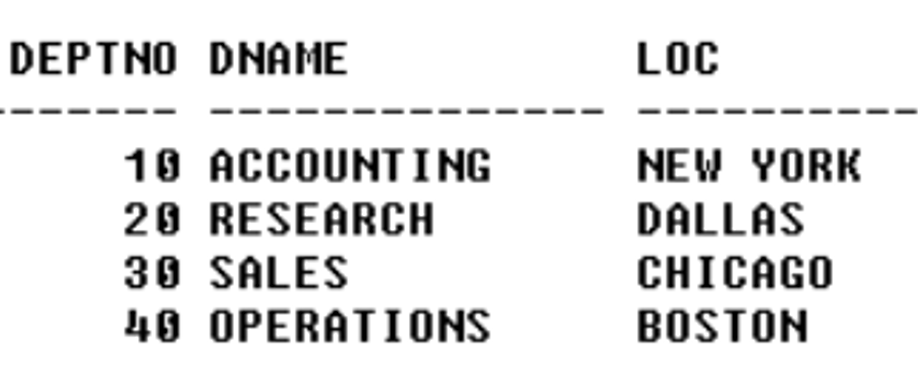
and name as EMP table as details of table also mentioned below.
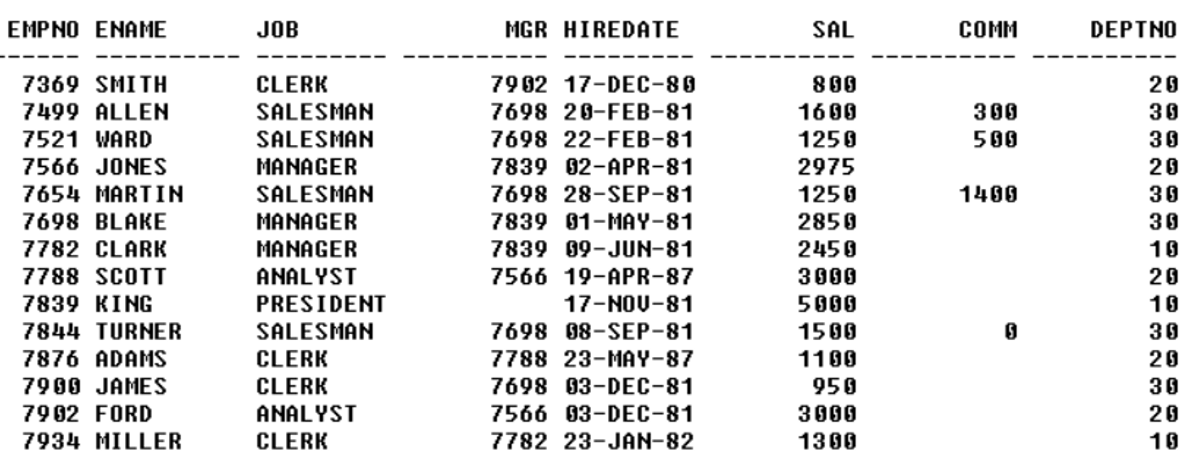
Create DEPT table
-- Create DEPT table
CREATE TABLE DEPT (
    DEPTNO INT PRIMARY KEY,
    DNAME VARCHAR(14),
    LOC VARCHAR(13)
);
Insert data into DEPT table
-- Insert data into DEPT table
INSERT INTO DEPT (DEPTNO, DNAME, LOC) VALUES
(10, 'ACCOUNTING', 'NEW YORK'),
(20, 'RESEARCH', 'DALLAS'),
(30, 'SALES', 'CHICAGO'),
(40, 'OPERATIONS', 'BOSTON');
Create EMP table
-- Create EMP table
CREATE TABLE EMP (
    EMPNO INT PRIMARY KEY,
    ENAME VARCHAR(10),
    JOB VARCHAR(9),
    MGR INT,
    HIREDATE DATE,
    SAL INT,
    COMM INT,
    DEPTNO INT,
    FOREIGN KEY (DEPTNO) REFERENCES DEPT(DEPTNO)
);
Insert data into EMP table
-- Insert data into EMP table
INSERT INTO EMP (EMPNO, ENAME, JOB, MGR, HIREDATE, SAL, COMM, DEPTNO) VALUES
(7369, 'SMITH', 'CLERK', 7902, '1980-12-17', 800, NULL, 20),
(7499, 'ALLEN', 'SALESMAN', 7698, '1981-02-20', 1600, 300, 30),
(7521, 'WARD', 'SALESMAN', 7698, '1981-02-22', 1250, 500, 30),
(7566, 'JONES', 'MANAGER', 7839, '1981-04-02', 2975, NULL, 20),
(7654, 'MARTIN', 'SALESMAN', 7698, '1981-09-28', 1250, 1400, 30),
(7698, 'BLAKE', 'MANAGER', 7839, '1981-05-01', 2850, NULL, 30),
(7782, 'CLARK', 'MANAGER', 7839, '1981-06-09', 2450, NULL, 10),
(7788, 'SCOTT', 'ANALYST', 7566, '1987-04-19', 3000, NULL, 20),
(7839, 'KING', 'PRESIDENT', NULL, '1981-11-17', 5000, NULL, 10),
(7844, 'TURNER', 'SALESMAN', 7698, '1981-09-08', 1500, 0, 30),
(7876, 'ADAMS', 'CLERK', 7788, '1987-05-23', 1100, NULL, 20),
(7900, 'JAMES', 'CLERK', 7698, '1981-12-03', 950, NULL, 30),
(7902, 'FORD', 'ANALYST', 7566, '1981-12-03', 3000, NULL, 20),
(7934, 'MILLER', 'CLERK', 7782, '1982-01-23', 1300, NULL, 10);
After that we can perform all the Query.
1) Write a Query to Display all details from the employee.
-- 1) Write a Query to Display all details from the employe table
select *
from EMP;
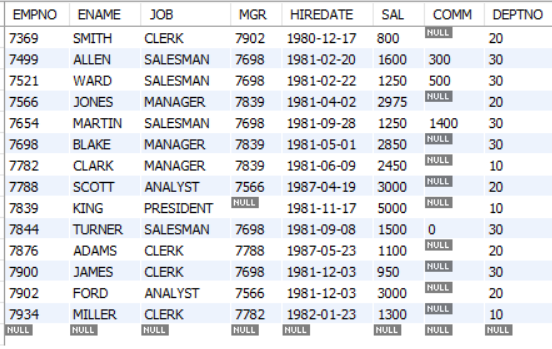
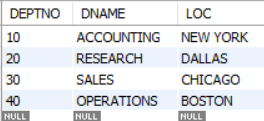
2) Write a Query to Display all details from the department table.
-- 2) Write a Query to Display all details from the department table
select *
from DEPT;
Level_01 QA
-- QUESTIONS ON EMP AND DEPT TABLE:
-- QUESTIONS ON EMP AND DEPT TABLE:
-- 1) Write a Query to Display all details from the employe table
select *
from EMP;

-- 2) Write a Query to Display all details from the department table
select *
from DEPT;

-- 3) Write a Query to Display NAMES OF ALL THE EMPLOYEES.
select ename
from emp;

-- 4) Write a Query to Display NAME AND SALARY GIVEN TO ALL THE EMPLOYEES.
select ename, sal
from emp;

-- 5) Write a Query to Display NAME AND COMMISSION GIVEN TO ALL THE EMPLOYEES.
select ename ,comm
from emp;

-- 6) Write a Query to Display EMPLOYEE ID AND DEPARTMENT NUMBER OF ALL THE EMPLOYEES IN EMP TABLE.
select empno, deptno
from emp;

-- 7) Write a Query to Display ENAME AND HIREDATE OF ALL THE EMPLOYEES .
select ename, hiredate
from emp;

-- 8) Write a Query to Display NAME AND DESIGNATION OF ALL THE EMPLPOYEES .
select ename, job
from emp;

-- 9) Write a Query to Display NAME , JOB AND SALARY GIVEN ALL THE EMPLOYEES.
select ename, job, sal
from emp;
-- 10)Write a Query to Display DNAMES PRESENT IN DEPARTMENT TABLE.
select dname
from dept;

-- 11)Write a Query to Display DNAME AND LOCATION PRESENT IN DEPT TABLE.
select dname, loc
from dept;